DeDe自定义附件字段包含多余Table解决办法

0

例如标签为{dede:field.doc/},字段名为doc,直接调用出结果为:

< table width=’300′>
< tr>
< td height=’30’ width=’20’>< a href=’/uploads/soft/091218/1-09121R11115.doc’ target=’_blank’>< img src=’~~cfg_phpurl~~/img/addon.gif’ border=’0′ align=’center’>< /a>< /td>
< td>< a href=’/uploads/soft/091218/1-09121R11115.doc’ target=’_blank’>< u>/uploads/soft/091218/1-09121R11115.doc< /u>< /a>< /td>
< /tr>
< /table>

这样在为附件定义样式的时候就很麻烦,只调用下载地址的方法为:

{dede:field.doc runphp=yes}@me=trim(strip_tags(@me));{/dede:field.doc}

利用php语句将下载链接”抽”出来。
WordPress CMS插件-Pods CMS:简单定制企业网站(下)

0

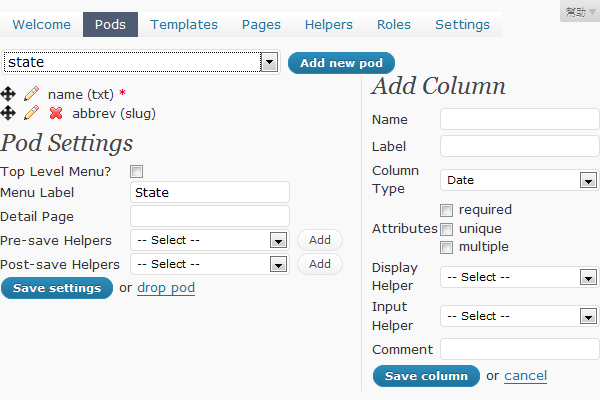
上回我们谈到Pods后台能设定pods,templates,pages,就好比MVC架构的三个特性。在pods页面,我们先选state这个pod来看一下设定画面:

wordpress_cms

左上角的name是预设的第一个栏位,每个pods都会有一个name。而下一个栏位abbrev就是自定义出来的,所以这个pod有两个栏位。如果需要自定义pod,就新增一个,再看自己需要什么样的栏位,一一设定进去就行了。设定好pod的栏位,就能到后台选单里的Pods发现多了一个 Add xxx的选项,以state来说就是Add state,这边就能新增pod的内容,而wp后台pods选单还有browse content选项,可以看到所有设定好的pod及其内容。

进入templates我们可以发现像标签模版的语法,像是{@name}这样的语法,就是取得pods的name栏位内容;而进入pages我们也能看到一些特定的api,可以去取得pods的内容,并且套用templates的设定后,再行输出。

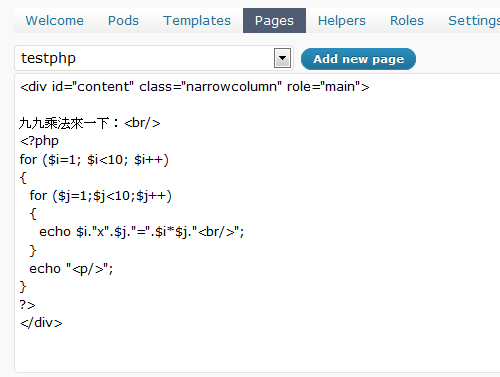
如果各位跟我一样,一开始对pods的设定及使用没有太多耐心,其实我们也能直接就用pages来设计我们自定义的动态页面,我们来试试看吧! 首先进入pages,然后新建一个名为testphp的页面,我们随便写一段php代码,就写九九乘法表好了XD,如下 (请先别学范例在里面打中文,稍后说明原因):

wordpress_cms_1

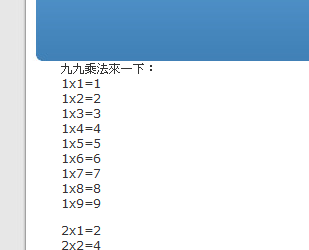
之所以会加上那个div的语法来包住它,主要是因为配合wordpress预设的template,因为这个自定义页面会被嵌进template之中,请依各种templates 的设定来修改,否则页面可能会乱掉。我们用php语法如此自定义了一个动态页面后,就可以输入 http://您的博客网址/testphp 来观看结果了!

wordpress_cms_2

请注意,若您输入中文可能会在这里出错,因为pods预设的资料库语系是瑞典文,请进入phpmyadmin修改wp_pod_pages资料表各栏位的语系为unicode语系,才能支持中文!

在此仅仅以两篇入门文快速介绍了Wordpress Pods CMS外挂,相关的API使用,还需要查询官网来做进一步的理解。

Pods CMS外挂,让我们能在Wordpress中插入自制的动态网页,如此我们可以很方便的定制出其他类型的功能,在设计企业使用的CMS网站时,无疑是一个便利的工具!

WordPress CMS插件-Pods CMS:简单定制企业网站(上)

0

WordPress是一款开放源代码(open source)的博客站软件,自从2003年问世后,就逐渐成为自架博客的指标性软件。也因为它开放性的插件(Plug-in)机制,让许多国内外的好手都加入编写插件行列,成千上万的插件给了Wordpress无限的想像空间。

单页面网站优化秘籍

0

用单页面在一周内带来一万IP,似乎是顶级SEOER的杰作,一直没有人透露其中的技巧,都在暗暗地赚钱了。其实做 SEOER也不需要这么狭隘,关键词的资源,不是某一个SEOER能做得完的。今天把其中的技巧完全分享出来,希望有心得朋友,能达到用单页面或者若干页面,一周内做到上万IP的目标。

11个WordPress Revolution Themes

0
Revolution Themes WordPress PACK [11 Themes][StudioPress] 

This pack contain 11 WordPress Premium Themes from RevolutionTheme.com

Revolution Themes WordPress PACK [11 Themes][StudioPress]

11个wordpress themes名字

– Revolution 2.0
– Revolution City 1.0
– Revolution City Gray 1.0
– Revolution Music 1.0
– Revolution Pro Media 1.0
– Revolution Realestate 1.0
– Revolution Tech 2.0
– Revolution Code Blue
– Revolution Magazine
– Revolution News
– Revolution Sports

英文流量交换站,国外流量交换

0

Traffic G – http://trafficg.com/  – ( 推荐 )
Traffic Syndicate 25 – http://www.ts25.com/ – ( 推荐+研究 )
Start Xchange – http://www.startxchange.com/  – ( 推荐)
Traffic Pods – http://trafficpods.com/ – ( 推荐 )
Webmaster Quest – http://webmasterquest.com/   
Hit Pulse – http://www.hitpulse.com/  – ( 推荐 )
123 Clicks – http://123clicks.com/   
No More Clicking – http://nomoreclicking.com/   
Real Hitz 4 U – http://www.realhitz4u.com/   
Traffic Hoopla – http://traffichoopla.com/  – ( 推荐 )
Savvy Clicks – http://www.savvyclicks.com/

一则清爽的404页面

0

朽木自雕

<html>
<head>
<title>404错误-未找到该页</title>
<META http-equiv=Content-Type content="text/html; charset=utf-8">
<META http-equiv="refresh" content="5";URL="http://xiumu.org/">
<style type=text/css>
a:link {
	color: #555555; text-decoration: none
}
a:visited {
	color: #555555; text-decoration: none
}
a:active {
	color: #555555; text-decoration: none
}
a:hover {
	color: #6f9822; text-decoration: none
}
.text {
	font-size: 12px; color: #555555; font-family: ""; text-decoration: none
}
.text_title {
	font-size: 14px; color: #555555; font-family: ""; text-decoration: none
}
.style1 {font-size: 15px ; font-weight: bold;}
</style>
 
</head>
<body>
 
<table height="100%" cellspacing=0 cellpadding=0 width="100%" align=center border=0>
 
 
<tr>
 
<td valign="center" align="middle">
 
<table cellspacing=0 cellpadding=0 width=500 align=center border=0>
 
 
<tr>
 
<td width=17 height=17><img height=17 src="images/co_01.gif" width=17></td>
 
 
<td width=316 background="images/bg01.gif"></td>
 
 
<td width=17 height=17><img height=17 src="images/co_02.gif" width=17></td>
 
</tr>
 
 
<tr>
 
<td background="images/bg02.gif"></td>
 
 
<td>
 
<table class=text cellspacing=0 cellpadding=10 width="100%" align=center border=0>
 
<tr>
 
<td>
 
<table cellspacing=0 cellpadding=0 width="100%" border=0>
 
<tr>
 
<td width=20></td>
 
 
<td><img height=66 src="images/404error.gif" width=400></td>
 
</tr>
</table>
</td>
</tr>
 
 
<tr>
 
<td>
 
<table cellspacing=0 cellpadding=0 width="100%" border=0>
 
<tr>
 
<td background="images/dot_01.gif" height=1></td>
</tr>
</tbody>
</table>
 
 
<table class=text cellspacing=0 cellpadding=0 width="100%" border=0>
 
<tr>
 
<td width=20></td>
 
 
<td>
 
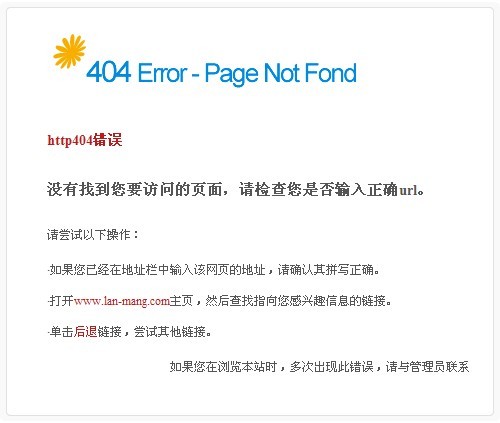
<strong class="text_title"><font color=#ba1c1c>http404错误</font></strong>
 
  <span class="style1">
  没有找到您要访问的页面,请检查您是否输入正确url。</span>  
 
 
请尝试以下操作:
 
·如果您已经在地址栏中输入该网页的地址,请确认其拼写正确。
 
  ·打开<a href="http://xiumu.org/"><font color="#ba1c1c">xiumu.org</font></a>主页,然后查找指向您感兴趣信息的链接。
 
  ·单击<a href="javascript:history.back(1)"><font color="#ba1c1c">后退</font></a>链接,尝试其他链接。
 
如果您在浏览本站时,多次出现此错误,请与管理员联系&nbsp;
 
<div align="right"></div></td>
</tr>
</table>
</td>
</tr>
</table>
</td>
 
 
<td background="images/bg03.gif"></td>
 
</tr>
 
 
<tr>
 
<td width=17 height=17><img height=17 src="images/co_03.gif" width=17></td>
 
 
<td background="images/bg04.gif" height=17></td>
 
 
<td width=17 height=17><img height=17 src="images/co_04.gif" width=17></td>
 
</tr>
</table>
 
 
<table class=text cellspacing=0 cellpadding=0 width=500 align=center border=0>
 
<tr>
 
<td></td>
</tr>
 
 
<tr>
 
<td align="middle"></td>
</tr>
</table>
</td>
</tr>
 
</tbody>
 
</table>
 
</body>

下载地址:404